Case Study · motion.saas · Indie · Open Source
motion.saas: prompt to cinematic ad in eight seconds.
A solo indie tool that turns a prompt into a SaaS launch ad. Multi-agent storyboards orchestrated by a Director agent, rendered programmatically with React Remotion, edited on a canvas. Built end-to-end in two weeks. Open-sourced on GitHub. Live at saasmotion-theta.vercel.app.
- Role
- Designer · Builder (solo)
- Type
- Indie · Open source
- Stack
- Next.js · Remotion · NIM · Gemini
- Status
- Live · WIP
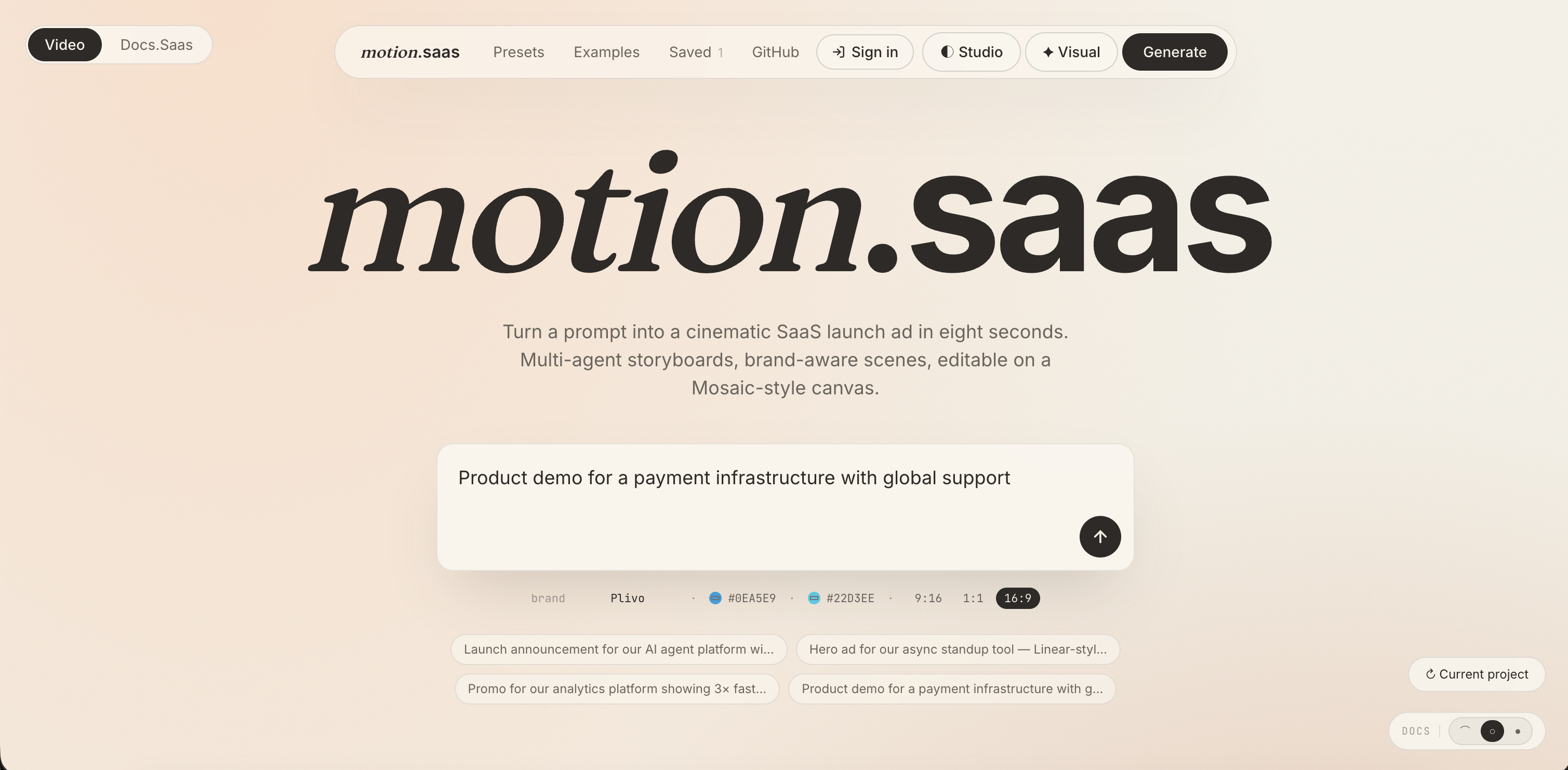
What motion.saas does
A user types a prompt, “Launch announcement for our AI agent platform with 50k developer users”, picks a brand preset (Linear, Vercel, Stripe, Notion, Claude, Cursor, fourteen in total), and gets back a cinematic SaaS launch ad in roughly eight seconds. The ad is editable on a canvas afterwards: change the sequence, edit any node, retool the copy. Export to 9:16, 1:1, or 16:9.
The problem
A product marketer, a PM, or a product head wants to ship a feature-launch announcement. They don't want to learn After Effects. They don't want to wait 2–3 days for a freelancer. They want something that looks like the kind of ad a well-funded startup ships, and they want it before the end of the afternoon.
Existing AI-video tools mostly went the user-generated-content route (stock clips, talking-head avatars, generated video frames). That's the wrong shape for SaaS launches. SaaS launch ads are motion graphics: type animating in, charts ticking up, a logo locking into place, a feature card sliding across a product UI. That category was open.
“I wanted people to make motion graphics with ease, managers, PMs, product heads. Without learning the tools.”
“We need a 10-second launch graphic today, not in three days when the freelancer gets back.”
Who it's for
Primary user: product marketers and PMs at new-age startupswho need to ship announcement graphics regularly but aren't designers and shouldn't have to be. Designers can use it too, and several of those I spoke with said they would, especially for quick takes and feature-update graphics where the heavy-lift After Effects pipeline is overkill.
Validation
Before building anything, I walked the concept past designers and product marketing managers I knew. The reaction landed in two directions at once: PMMs immediately recognised the pain (the 2–3 day freelancer loop for a 10-second graphic), and designers said the canvas-edit-after-generation step is what would actually convince them to use the output instead of redoing it themselves. Both signals shaped the product.
The competitive gap
The AI-video space crowded fast: Runway, Pika, Synthesia and others all push generated video frames or UGC-style stock. motion.saas takes the opposite approach:
- No UGC, no generated video frames. Every visual is programmatically rendered with React Remotion. That means the output is sharp, on-brand, fast, and editable as data, not a black-box video file you can't tweak.
- Brand-aware presets, not generic templates. Each preset loads a brand's actual colour palette, typeface, and visual elements. The result reads as Vercel or Linear, not as a generic ad with a logo slapped on.
- Canvas editing after generation. The output isn't terminal. Users can re-sequence scenes, edit copy and visuals inside any node, and re-render. That's the part designers said earned their trust.
The system: a Director agent orchestrating specialists
The interesting engineering decision was to do this as multi-agent orchestrationrather than one giant prompt. A single prompt that has to “write the script, pick the scenes, lay out the timeline, format the data, and animate the result” is the kind of prompt that fails in five different ways at once. Splitting it into specialists made each step inspectable, retryable, and individually upgradable.
Hover or tap any node to see what it does.
Why this orchestration matters
The Director agent doesn't just route, it enforces structure (the agents have to return data the storyboard schema accepts), retries when a specialist returns something malformed, and keeps the prompt context tight for each downstream call. The handoff between agents is a structured JSON document, not natural language passed between LLMs. That makes the pipeline debuggable in a way that single-prompt systems never are.
The model layer: MoE via NVIDIA NIM, Gemini as fallback
Most solo builders reach straight for OpenAI or Anthropic. I went the other direction, a Mixture-of-Experts setup through NVIDIA NIM with open-weight models (Llama, Qwen, and others) doing the agent work, and Gemini as a fallback when NIM is unavailable or returns degraded output. The reason was unfashionably simple: open source and free.An indie tool that depends on per-call costs from a frontier API can't stay free forever; one that runs on open models can.
The side benefit is architectural, different agents can use different modelswithout rewriting anything. The Timeline agent doesn't need the same model the Data agent does. MoE lets the right model handle the right job.
- Frontend Next.js (App Router) deployed on Vercel.
- Rendering React Remotion, programmatic motion graphics.
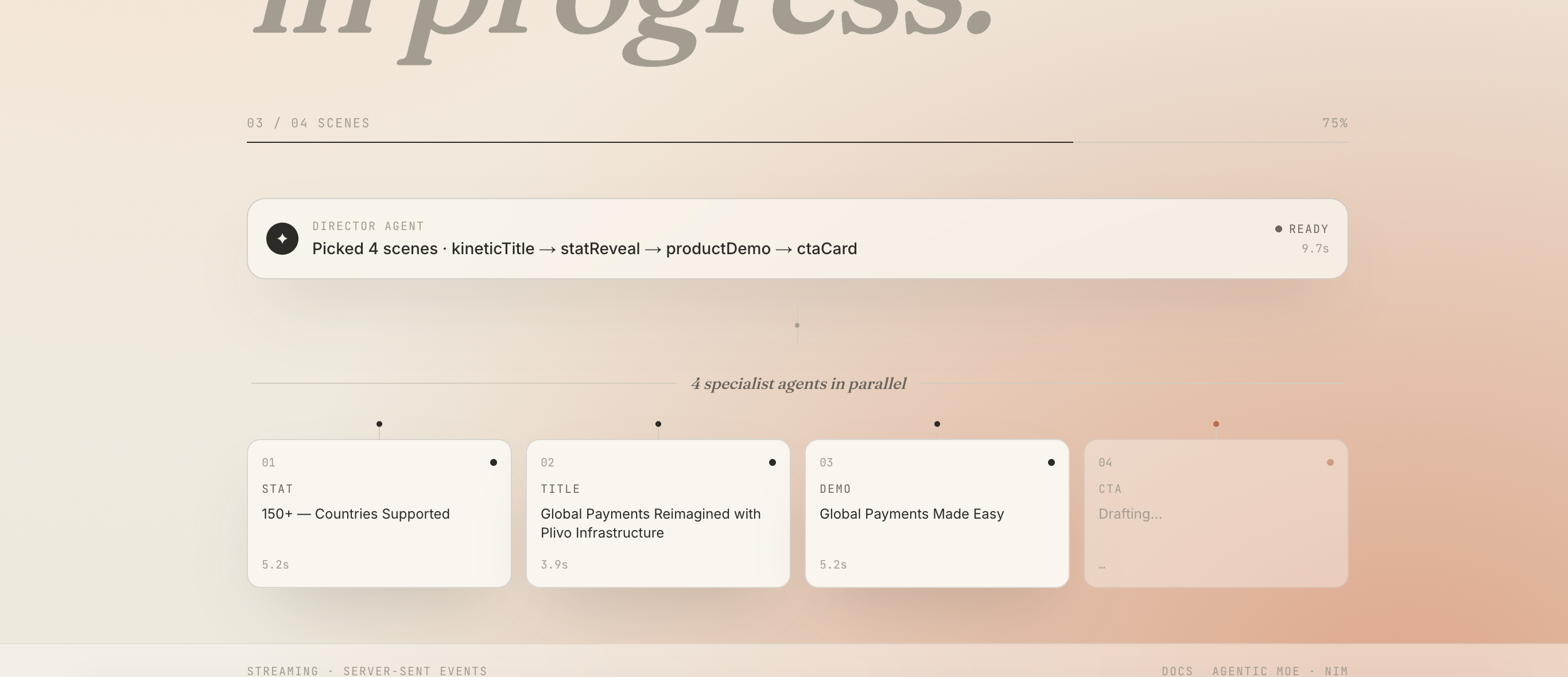
- Agent runtime Director + 4 scene specialists (kineticTitle, statReveal, productDemo, ctaCard) running in parallel.
- Model layer MoE via NVIDIA NIM (Llama, Qwen, …) · Gemini fallback.
- Repo Open source on GitHub.
The product
One screen, one job
The home screen is one screen and one screen only: a serif motion.saas wordmark, a single prompt input, the brand controls (colour, accent, aspect ratio), and four tested example prompts that double as a fast-onboarding guide. The example prompts are clickable demos and prompt-shape templates, a new user learns the format by doing, not by reading docs.
Stream the agentic work, not a spinner
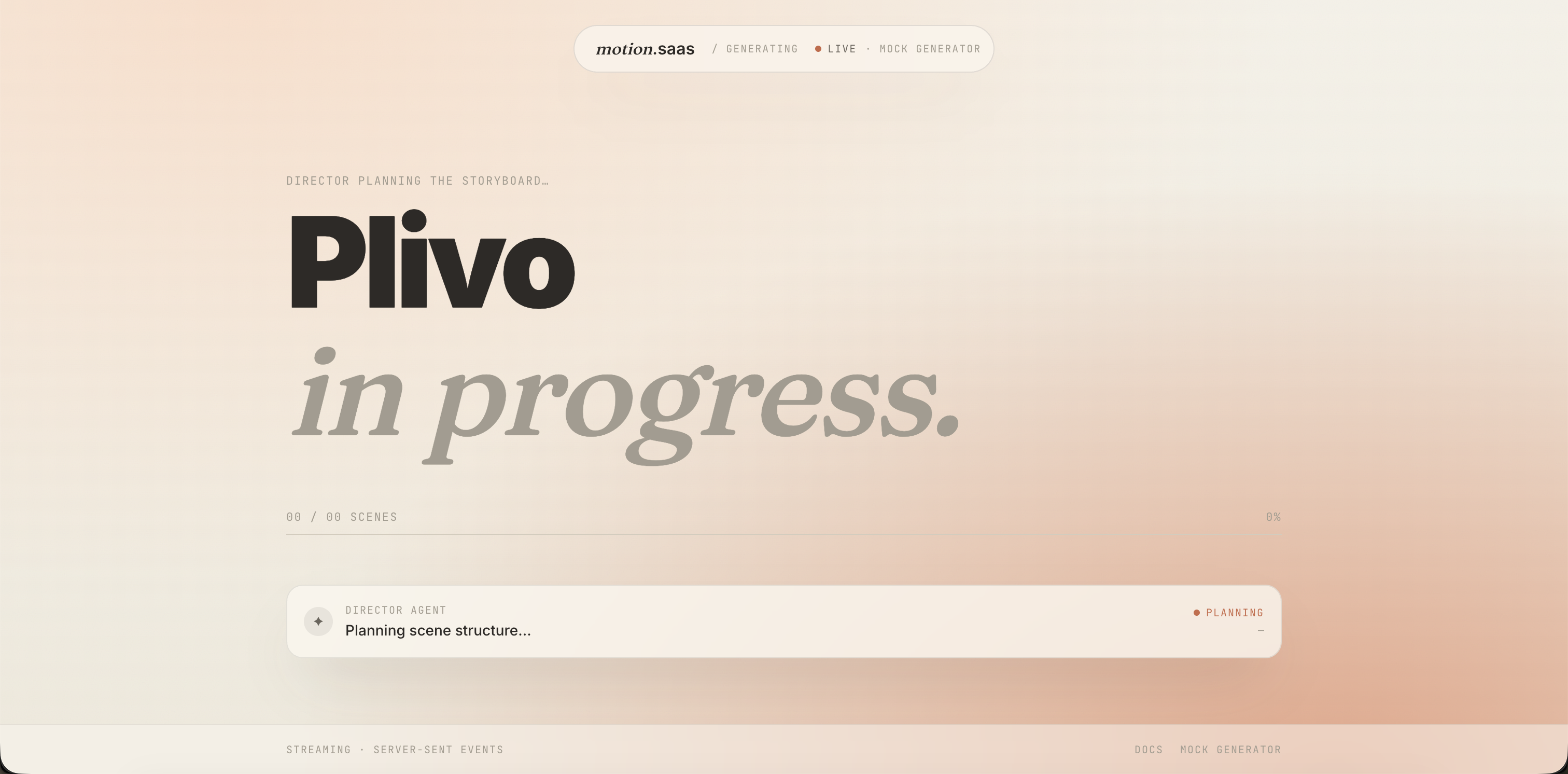
This is the part of the product I'm proudest of as a design decision. Instead of showing a generic spinner, motion.saas streams the actual agentic work to the screen, the Director plans the storyboard first, then the four scene specialists run in parallel, each producing their scene live as it streams via server-sent events. The user watches the architecture do its job.
It's a working diagram of the system, and it's also a trust-builder: when something arrives in eight seconds, you want to see that something was happening behind it.
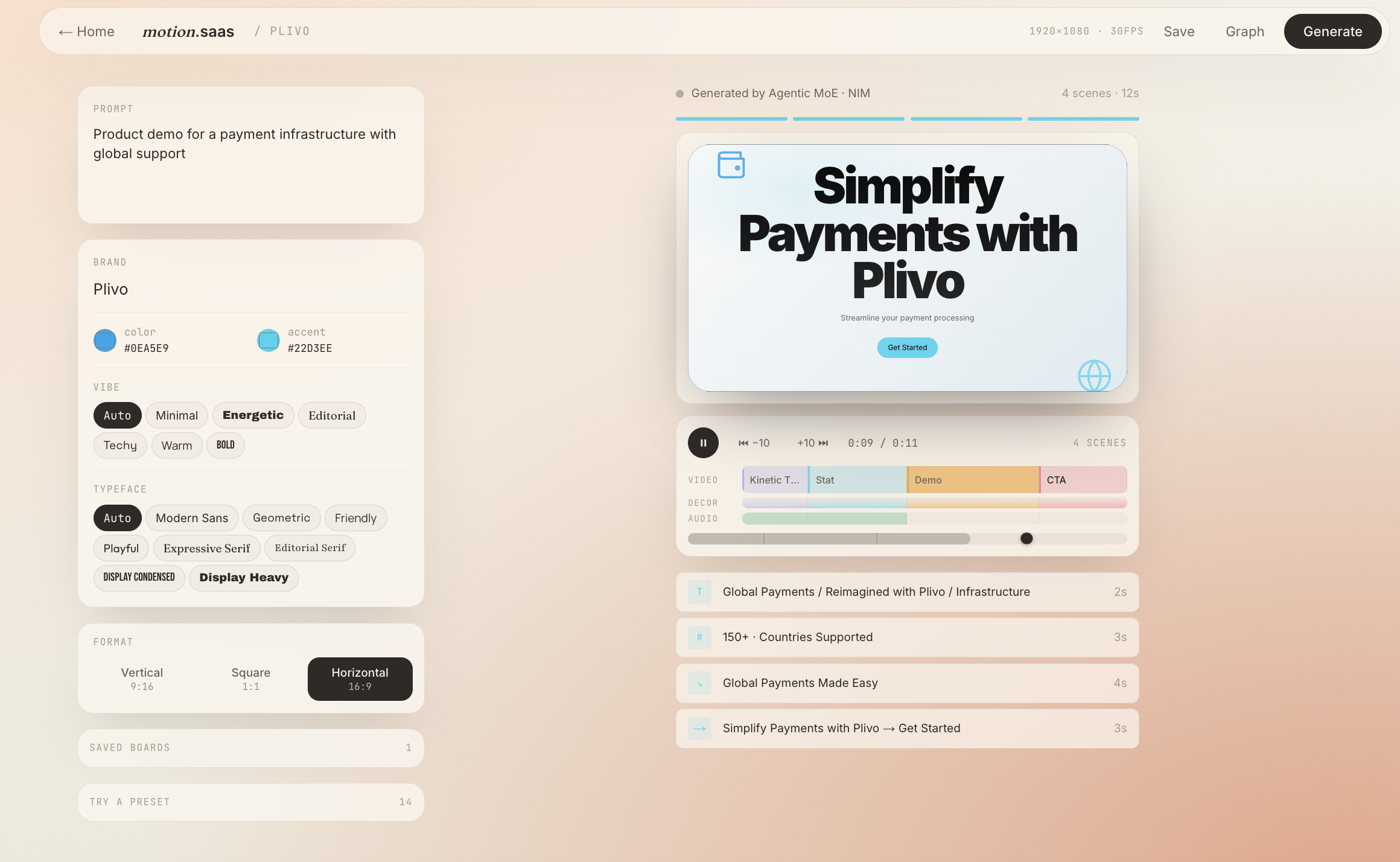
Generated output + brand controls
Once the storyboard finishes, the user lands in the Studio: prompt on the left, brand controls (colour, accent, vibe, typeface, format), and the rendered ad with a scene timeline on the right. The timeline shows each scene as a labelled segment, Kinetic Title, Stat, Demo, CTA, with the underlying video, decor, and audio tracks visible underneath. Editing a scene goes straight from a click on the timeline to a focused editor.
The storyboard as an editable graph
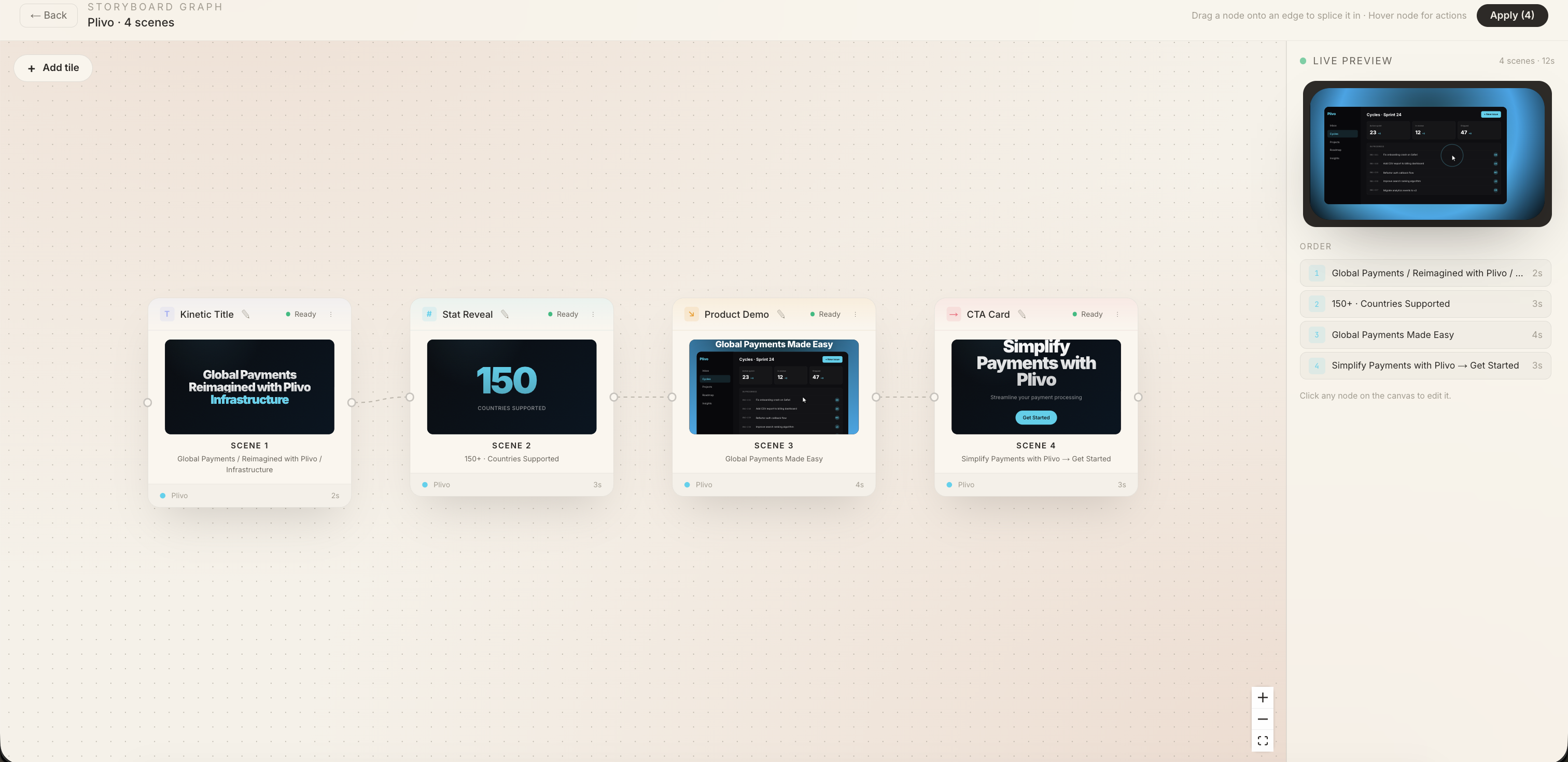
Behind the linear Studio timeline is the storyboard graph: every scene as a node, every connection as a draggable edge, with a live preview locked to the right. Drag a node onto an edge to splice it in. Hover for actions. The mental model is a Mosaic-style canvas where the structure of the ad is editable as a graph, not just as a timeline.
Authoring the camera, not just the content
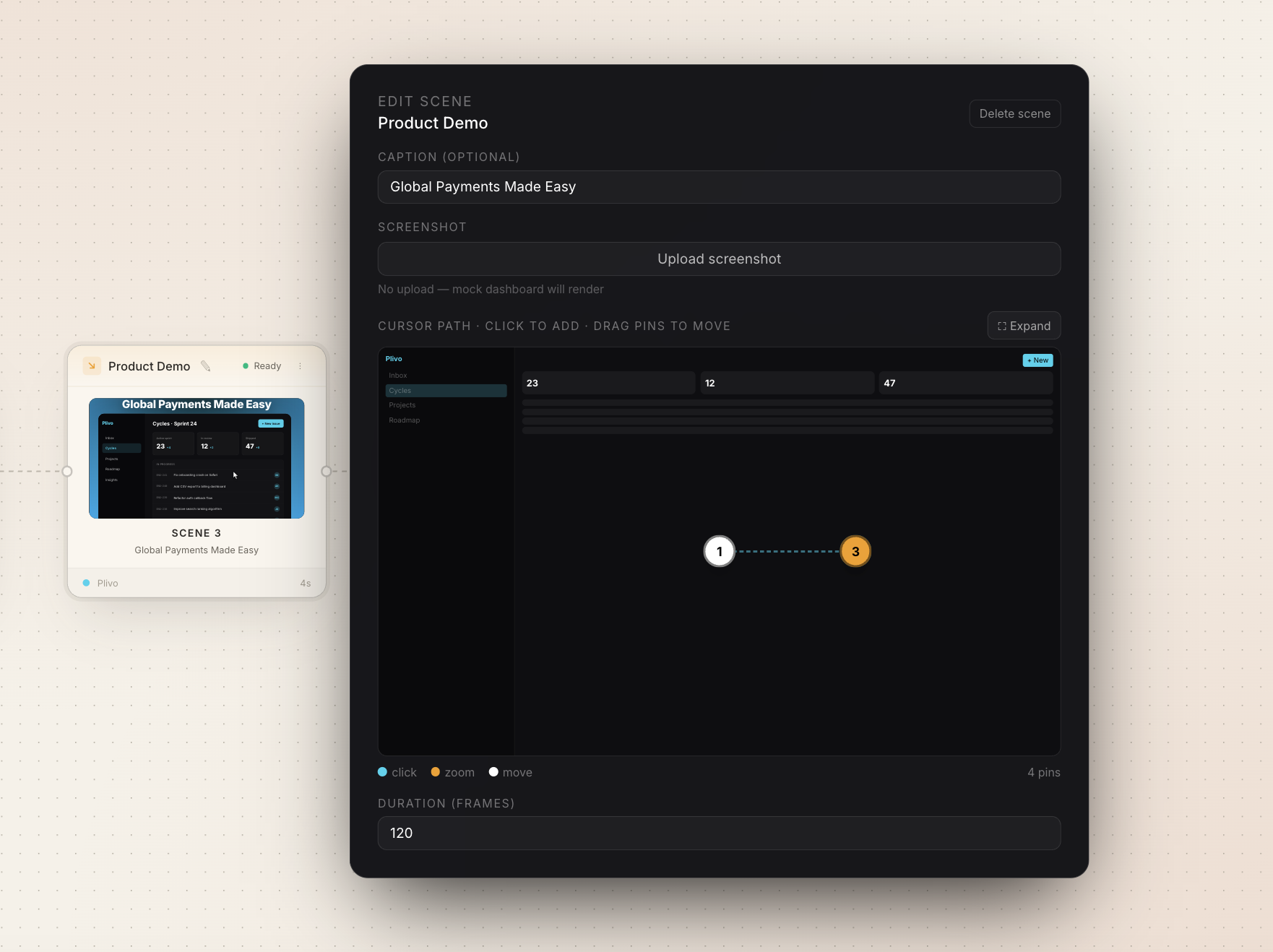
Open any node and you get a focused editor: caption, screenshot upload (or a generated mock if none), and, for product demo scenes, a cursor patheditor where you can place click, zoom, and move pins on the dashboard. Frame-level duration in the footer. This is the layer most AI-video tools don't have at all: the user can author the camera, not just the content.
Outcomes
- Live and open source. Deployed at saasmotion-theta.vercel.app and open-sourced on GitHub.
- Not commercially deployed. This is a portfolio and learning piece, not (yet) a product with paying users.
- Positive validation feedback from the designers and PMMs I've shown it to, particularly on the canvas-edit step.
- Actively maintained. New presets, better agent prompts, and render-quality improvements all on the roadmap.
What I learned
The single thing I'm taking forward from this project is how to think about multi-agent orchestration as a design problem, not just an engineering one. A Director-and-specialists pattern is a design pattern as much as a system architecture: it forces you to be specific about what each agent knows, what it's allowed to say, and how its output combines with others. That clarity shows up in the product. The reason motion.saas can generate something usable in eight seconds isn't model speed, it's that the agents have small, well-defined jobs.
The secondary lesson was about open-weight models in production. The economics of an indie tool change completely when you're not paying per token at a frontier price. NIM + Llama/Qwen made the difference between “I can keep this free” and “I have to charge or kill it.”
What's next
motion.saas keeps evolving, more presets, better defaults, deeper canvas editing, sharper agent prompts. The bigger question is whether to keep it as a portfolio piece or push it toward a real product surface. The honest answer right now is: I'm watching how people use it and letting that decide.